
The "MyChart Medicare Kit" Email Is a Scam. Here's How to Spot It
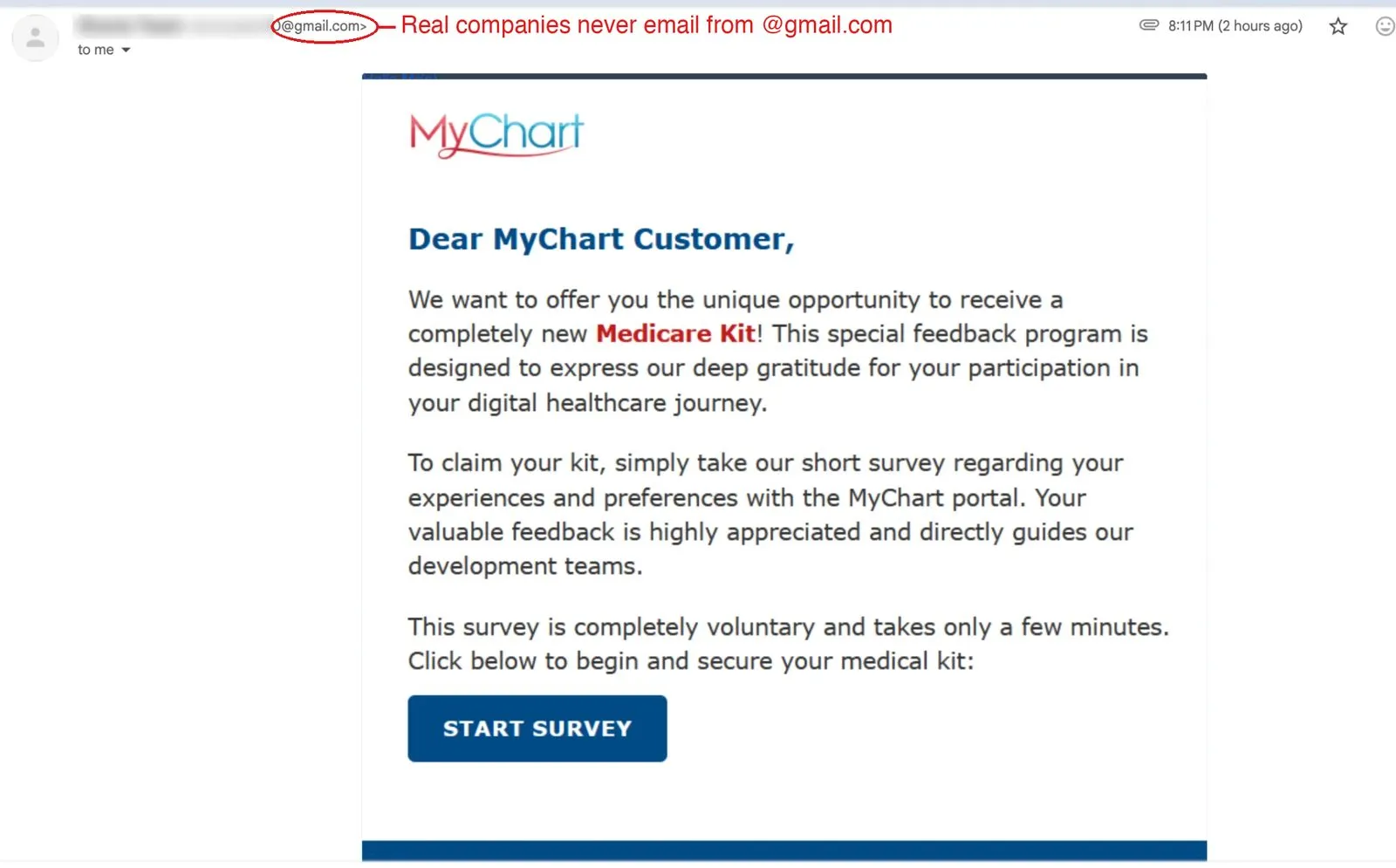
Short answer: if an email from “MyChart” is offering you a free Medicare Kit for taking a survey, it’s a phishing scam. Don’t click anything. Report it as phishing and delete it.
We received one of these ourselves this week, and it’s a good example of how polished fake emails have become. It has the MyChart logo, clean formatting, a friendly tone, and a big blue START SURVEY button. Here’s why it still doesn’t hold up.
What the email says
“Dear MyChart Customer, we want to offer you the unique opportunity to receive a completely new Medicare Kit! This special feedback program is designed to express our deep gratitude for your participation in your digital healthcare journey… Click below to begin and secure your medical kit.”
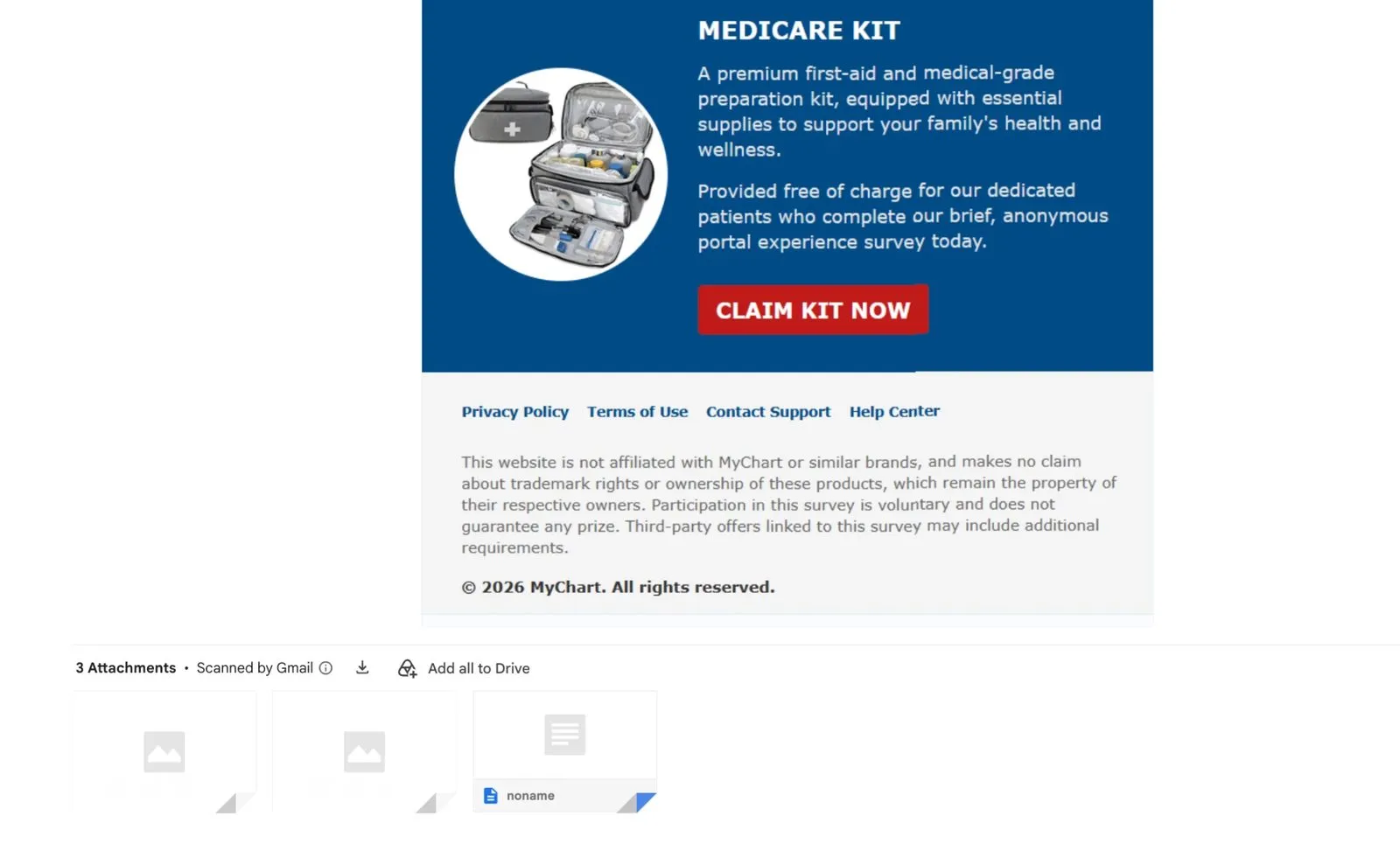
Further down, a second block advertises a “MEDICARE KIT”, “a premium first-aid and medical-grade preparation kit,” with a red CLAIM KIT NOW button.
The red flags
- It came from a Gmail address. We circled it in the screenshot. Real
health systems, banks and software companies send email from their own
domain, not from a free
@gmail.comaccount. This is the single fastest check, and it works on most scam emails. - “Dear MyChart Customer.” A real MyChart notice is tied to your account and health system. Generic greetings suggest a mass mailing.
- A “free” prize for a short survey. Reward-for-survey offers are among the oldest phishing hooks. Real healthcare organizations don’t hand out medical kits for feedback.
- The footer disclaimer gives it away. The fine print says “This website is not affiliated with MyChart or similar brands, and makes no claim about trademark rights,” and that “Third-party offers linked to this survey may include additional requirements.” A genuine MyChart message would never say it isn’t affiliated with MyChart. This is a legal shield for the scammer, and it means the link leads to someone else’s website.
- Odd attachments. The email showed three attachments: two blank image placeholders and a file named “noname.” Real organizations don’t send mystery files with a survey invitation.
- “Scanned by Gmail” isn’t a safety stamp. That label only means Gmail checked the attachments for known viruses. It says nothing about whether the email itself is a scam.
What these scams usually want
The buttons typically lead to a form that asks for your name, address, phone, date of birth, and eventually a “shipping fee” card payment. That gets the scammer your identity details and card number. Some versions also push a download or a phone number. We didn’t click through on ours, so we can’t tell you exactly where this one led, and we don’t recommend finding out.
What to do with an email like this
- Don’t click anything. Not the buttons, not the footer links, not “unsubscribe.”
- Don’t open the attachments.
- Report it. In Gmail: three-dot menu → Report phishing. We reported ours as spam right away.
- Report it to the FTC at ReportFraud.ftc.gov. If it mentions Medicare, you can also call 1-800-MEDICARE to ask whether an offer is real.
- Check your real account separately. If you’re worried about your health portal, open your health system’s official website or the MyChart app you already have, and sign in there.
If you already clicked and entered information, see the FAQ below for the steps. And if a parent or neighbor gets emails like this, please forward this page. Older adults are targeted more often with Medicare- and health-themed lures.
This follows the same pattern as the fake Geek Squad renewal email and the “we’ve blocked your account” phishing email: a familiar brand, a reason to act now, and a button to click instead of a way to verify. If clicking made things worse, such as pop-ups starting afterward, read about fake McAfee pop-ups on Windows.
Not sure if something is real? Send it to us
We check suspicious emails, texts and pop-ups for neighbors in Marlboro, Morganville, Manalapan, Freehold, Holmdel, Colts Neck, Aberdeen, Matawan and Old Bridge, and it costs nothing to look. Send us a screenshot or bring the device to our Marlboro, NJ shop. If a click did let something onto your computer, our virus and malware removal service cleans it up and checks that nothing else got through.
Frequently asked questions
Is the MyChart Medicare Kit email real?
No. A real MyChart message comes from your own health system and doesn't offer free medical kits for taking a survey. This email came from a random Gmail address, opens with "Dear MyChart Customer," and asks you to click through a "Start Survey" button. All of that points to phishing.
I clicked "Start Survey" or "Claim Kit Now." What should I do?
Close the page and don't enter anything. If you typed a password, change it right away (and anywhere else you use it). If you gave a credit card, Medicare number or other personal details, call your bank or card issuer, and consider a fraud alert with the credit bureaus. If you're unsure what happened, bring the device in and we'll check it.
Why did Gmail say "Scanned by Gmail" if it's a scam?
That label means Gmail checked the attachment for known viruses. It doesn't mean the email or the link is safe. Phishing emails often contain no malware at all. The link takes you to a convincing fake page that collects what you type.
Why do scammers target seniors with "free Medicare kit" offers?
Because Medicare and health-portal branding feels official and time-sensitive, and many people are used to getting real mail about their health coverage. Scammers copy that look to get a click, then ask for personal or payment information.
What's the safest way to report it?
In Gmail, open the message, click the three-dot menu and choose "Report phishing." Don't click any links or open any attachments first. If you want a second opinion before deleting it, send us a screenshot.